
Airalo esim Review: Our Experience Using it
Trying to work out how you’ll use your phone abroad can turn into another job on the trip-planning list. If you’re considering an eSIM, this Airalo review covers what I’ve learned from using one on several trips with my kids.
I’ve used Airalo in Portugal, the Netherlands, Germany, Luxembourg and Iceland. Once I had it connected, the service worked well for us. Getting it set up was the part I found confusing, and on one trip, I ended up buying twice because I didn’t recognise the eSIM I’d already installed.
Would I use it again? Absolutely. Here’s what worked for us, what caught me out and what I’d recommend checking before buying a plan.
This post contains affiliate links. If you make a purchase through one of these links, we may earn a small commission at no extra cost to you. As always, we only recommend products and experiences we truly believe in.
My quick Airalo review
Airalo has worked well for the way we travel: data on my phone for maps, looking things up and occasional work, with Wi-Fi at our accommodation when it’s available.
I’ve bought country-specific plans rather than a multi-country package. Those suited our trips, including separate plans for Germany and Luxembourg.
My main frustration was understanding the setup, rather than the connection itself. Once connected, I didn’t experience slow service or connection problems on those trips. That’s my experience in the places we visited, rather than a promise of coverage everywhere.
I’ve considered trying another provider, but have continued to return to Airalo. I haven’t tested enough alternatives to call it the best eSIM company, but it’s one I’ve used several times and would use again.
What is Airalo?
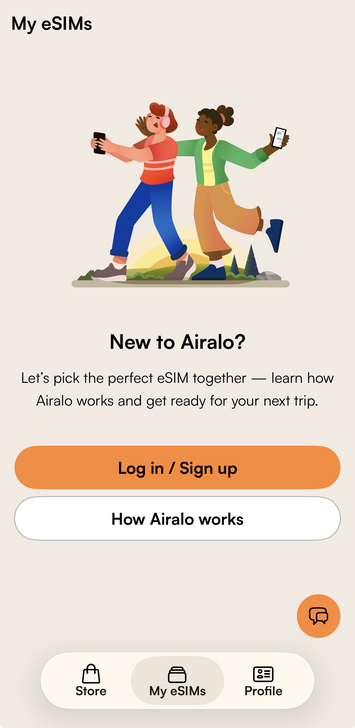
Airalo sells travel eSIMs and mobile packages through its app and website. An eSIM is a digital SIM, so you can set up a connection on a compatible phone without inserting another physical SIM card.
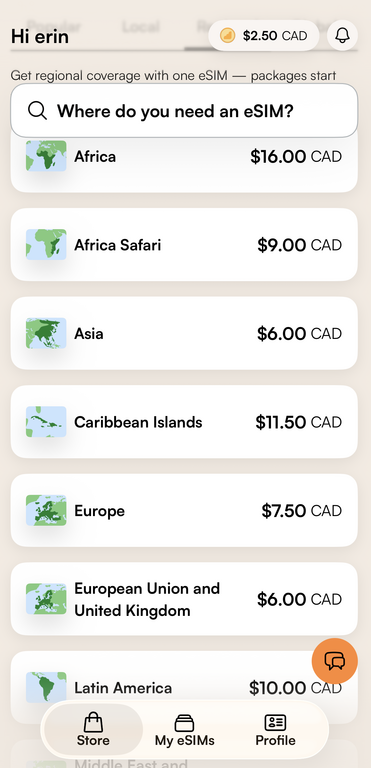
You can choose local, regional or global coverage. Before buying, check the destinations included, the data allowance, the validity period and whether the package includes anything beyond data. You can browse Airalo’s destinations and package types here.
What networks does Airalo use?
Airalo connects through partner mobile networks, so the network available depends on your destination and package. Before buying, open the package details in the app or on the website and check the supported networks alongside the coverage area. Airalo lists these among the details to review before purchasing.
One trip, the Airalo plan used a provider from France, while another time it was the Orange network. It just depends which area of the world you’re looking to use it in.
I’ve used Airalo in Portugal, the Netherlands, Germany, Luxembourg and Iceland, and once I had everything set up, I didn’t experience connection problems on our trips.
How I use Airalo when travelling with kids
Having mobile data makes travelling with kids a little easier. Whether you need to find somewhere to eat, check when the next train leaves or locate a nearby playground, you can look things up as you go instead of relying on finding Wi-Fi.
Most of my data goes towards using Google Maps, checking opening hours and looking things up while we’re out exploring. I occasionally use it for work too, especially if the boys are having a playground break.
I’ve also been happy with the coverage on our trips. Whether we were exploring cities in Europe or driving around Iceland, I didn’t have any issues with the connection once I had everything set up.
Of course, coverage can vary depending on where you’re travelling, but Airalo has worked well in the places we’ve visited so far.
My setup mistake (and how to avoid it)
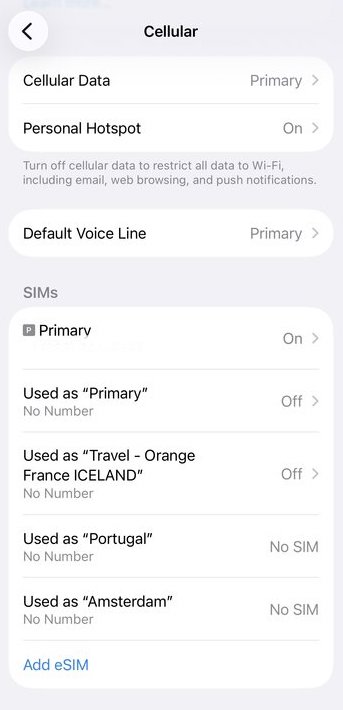
When I installed an eSIM, I expected it to appear in my phone’s settings as “Airalo.” It showed up under a different name associated with the destination or provider, and I didn’t recognise it.
I thought the installation hadn’t worked, so I went through the process again and ended up with two plans. The first one had been there all along.
Before installing your travel eSIM, check which SIMs are already listed in your phone’s settings and what they’re named. Taking a screenshot gives you something to compare afterwards.
Once you’ve installed it, check the new entry against the instructions instead of assuming it should be labelled “Airalo.” If you’re unsure whether installation worked, check your purchase and setup status before buying again.
Set it up with time to check it
I recommend setting up your eSIM before leaving for your trip so it’s ready to use when you arrive. You’ll need a reliable internet connection for the setup, which is why it’s easier to do at home.
I’ve forgotten to do this before and ended up setting mine up at the airport just before leaving. It worked, but it’s one less thing to worry about on travel day if you do it ahead of time.
Before installing your eSIM, though, check when your package starts. Some plans activate when you connect to a supported network at your destination, while others start as soon as you install them. You don’t want to use up part of your plan before you even leave.
Check which line is using data
Having the eSIM installed is only part of getting connected. You’ll also need to make sure you’ve turned your primary phone line off, so the eSIM will work.
Airalo explains how to configure your lines, including turning off your primary line to prevent it from generating roaming charges. You’ll want to do this, or you’ll be charged roaming fees while away.
Country plans or a multi-country eSIM?
I’ve always used country-specific plans. Even when our trips include multiple countries, like last year when we visited Portugal, Germany and Luxembourg, I bought individual esims for each country.
That worked best for us, but it does mean checking your next country’s package rather than assuming your current one will keep working across the border.
Airalo also sells regional and global options that cover multiple destinations. Check the actual country list before buying, especially for a trip with several stops. You might find it works better to have a multi-country card.
For your own trip, compare the total price, validity period and data allowance of separate country packages with a regional option. Country-specific plans worked best for us, but that doesn’t mean they’ll suit every family’s trip.
How much data do you need?
I could tell you the size of a package I bought, but it wouldn’t necessarily help you choose yours. Someone using maps occasionally and hotel Wi-Fi each evening will have different needs from someone uploading videos or working regularly.
You might want to consider:
- What you’ll use it for: maps and occasional searches, or frequent uploads, streaming and work.
- Where you’ll stay: accommodation with Wi-Fi, or a trip where mobile data is your main connection.
- How long you’ll need it: check both the data allowance and the number of days the package lasts.
Our Iceland campervan trip is a good example. I used more mobile data on that trip than on other trips where we had hotel Wi-Fi available each night.
I’ve always found the data lasted for what I needed, although you can always check your balance and top up on the go easily.
Keep an eye on your remaining allowance
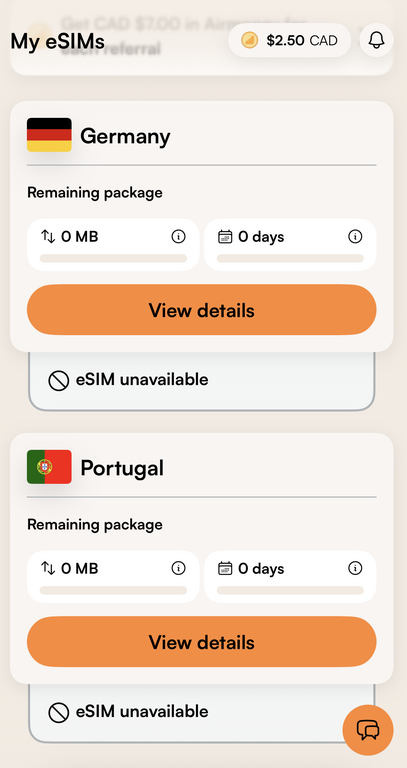
One feature I found useful was being able to log in and see how much data and time I had left.
When you log into the app, Airalo show you how much you’ve used, and how many days you have left.
It’s a good idea to check as you go rather than assuming you have enough until the end of the trip. If you need more, it’s easy to top up on the go, and you can always find packages for short amounts of time if needed. I’ve added one day to top up before.
Does everyone in the family need an eSIM?
For us, the data is only on my phone. My boys don’t have their own phones, so we aren’t buying a package for each family member.
For another family, you might need more than one plan though. If two adults split up during the day, both may want their own data. And if children have phones, think about whether they need mobile access or will use Wi-Fi.
I haven’t based this review on sharing data through a hotspot, so I wouldn’t choose a package on the assumption that it will cover several devices. Check the package’s tethering rules and your phone’s capabilities first if that’s your plan.
Airalo versus Canadian roaming
Canadian roaming isn’t cheap by any means, so I always find that Airalo is a better deal. But your phone plan may have better roaming options than mine, so it’s worth comparing.
Before purchasing, compare:
| Check | Airalo | Your Canadian plan |
| Total cost | Package price, plus any additional data you expect to buy | Roaming charges or travel add-on for your trip |
| Destinations | Countries explicitly included in the package | Countries included in your carrier’s roaming terms |
| Data | Allowance and validity period | Roaming allowance and any restrictions |
| Calls and texts | Check whether these are included | Check how your existing number works abroad |
I can’t put a dollar figure on my savings because I haven’t documented a like-for-like comparison from those trips. Check your own carrier’s current terms before assuming an eSIM will be cheaper.
What I liked, and what I’d watch out for
What worked for me:
- Reliable service once connected
- Inexpensive packages that suited our itineraries
- Being able to check remaining data and validity
- Having mobile data available while exploring, without relying entirely on hotel Wi-Fi
What I didn’t love:
- Setup can be confusing the first time, particularly if you make my mistake and don’t recognize the new SIM’s name
- Coverage includes data, but not phone calls and texting
- You need to check compatibility, activation rules and your home line’s settings (some older iphones won’t be compatible with esims).
Airalo FAQs
Do you have to install Airalo before leaving home?
It’s a smart idea to set it up before travelling while you have reliable internet and time at home to work through the setup. You could set it up once you land, if you have wifi, but I always like to have data when I land, just in case you need to check taxi or pickup reservations or locations.
Will the eSIM appear as “Airalo” on my phone?
Mine didn’t appear under the name I expected. Check the SIMs already on your phone before setup so you can identify the new one, and use the installation instructions to confirm it.
Can you use the same package in several countries?
Only if those countries are included in its coverage. I bought separate country plans; Airalo also offers regional and global options.
Can you make calls and send texts?
Check the package. Many options are data-only, while some include voice and SMS. A data-only plan doesn’t provide regular phone calls or SMS simply because your phone lets you select that line.
Did I have connection problems?
Once I understood the setup and had the correct connection selected, I had no issues at all.
Our Take: Would I recommend Airalo?
Yes, Airalo has worked well for us across several trips, and I’d absolutely use it again. In fact, I did.
The only thing I’d recommend is spend a bit of time making sure you set it up correctly. Check your existing SIM names, read the instructions for your package and give yourself time to confirm everything before travelling.
If you mainly want mobile data for maps, looking things up and staying connected while exploring, it’s a great option to consider.
